This section is still a work in progress (ㅠ﹏ㅠ)
If you find a bug, no matter how small, we would really appreciate it if you could report it to us! help@fallinguitars.com
Here are the bugs we know about:
-> Walking into a corner of a solid softlocks the game
-> The backstage cutscene fails to play
-> Holding notes does not add to score
Even if it is already known or on this list, any details are appreciated!
There's a reason this game is advertised as a "higly customizable rhythm game engine". I'm working on making this as customizable as possible!
Ever notice the "Guitars are falling!" message on the title screen? Or the intro message after "A COMPUTER GAME BY NOAH RIDER"? Want to change it?! YOU WANT TO CHANGE IT!!!!
When loading these messages, the game reads the config.ini file to see if there are any custom messages.
This all happens in the [MOTD] section.
The intro message is held in the key CustomIntroMessage. You can only have one of these.
On the other hand, the messages on the title screen are held in message(n), for the nth message.
The game will load any one of these messages at random on startup.
Also, if you want a newline character, the \n delimiter does not work. For newlines, you can use the & symbol.
Here are a few of mine:
            [MOTD]
            CustomIntroMessage="Get on the stage!"
            Message0="Guitars are falling!"
            Message1="Does the backstage have&free drinks"
            Message2="'Fun' for the whole family!"
This is pretty simple. Back in the config.ini file, the game checks the BackstageMusic tag in the section General.
This is a string that points to an audio file on your computer. Keep in mind that if this is not an Ogg Vorbis (.OGG) file,
the game will not recognize it, and instead load the default song (club.ogg).
Also, by default, the game will pitch the song with a range of 5% (from 95% to 105%), to add some variance. You can change this range (or disable it entirely)
with the BackstageMusicPitchRange key. If you want to disable it, just set the range to 0.
A quick example:
            [General]
            BackstageMusic="/home/kernel/music/gamblecore.ogg"
            BackstageMusicPitchRange="4"
And the result:
On startup, the game will read from the config.ini file to see if there are any custom sprites.
Each character has their own section in the INI file, in this format:
[CharacterSprites_(CHARNAME)]
For example, sprites for Apollo would be [CharacterSprites_Apollo]
Keep in mind that this is not fully implemented yet, sorry :(
Each character has 4 directions:
            down
            right
            up
            left
..and each direction has 5 keys:
            (direction)_bbox_left
            (direction)_bbox_top
            (direction)_bbox_right
            (direction)_bbox_bottom
The "bbox" variable stands for "bounding box" and it's how the game can help you collide with walls, and interact with objects.
Yes, you could just give yourself no bounding box and walk through walls as you please, but you also wouldn't even be able to get on the stage (˵ ¬ᴗ¬˵)
Without this, you wouldn't be able to do anything!!
(direction)_bbox_left is the pixels from the left edge to the bounding box's left side.
(direction)_bbox_top is the pixels from the top edge to the bounding box's top side.
(direction)_bbox_right is the pixels from the right edge to the bounding box's right side.
(direction)_bbox_bottom is the pixels from the bottom edge to the bounding box's bottom side.
You can add as many rocker sprites as you want. Keep in mind that in the future this may change.
When hitting a note, the rocker object will choose between all of the sprites you added, and pick one at random.
Each rocker sprite has 3 keys:
            rock(n)
            rock(n)_xoff
            rock(n)_yoff
rock(n)_xoff is the x offset for the sprite.
rock(n)_yoff is the y offset for the sprite.
For the x and y offsets, the default sprites have their offsets placed at the bottom middle of the sprite.
Keep this in mind when adding them.
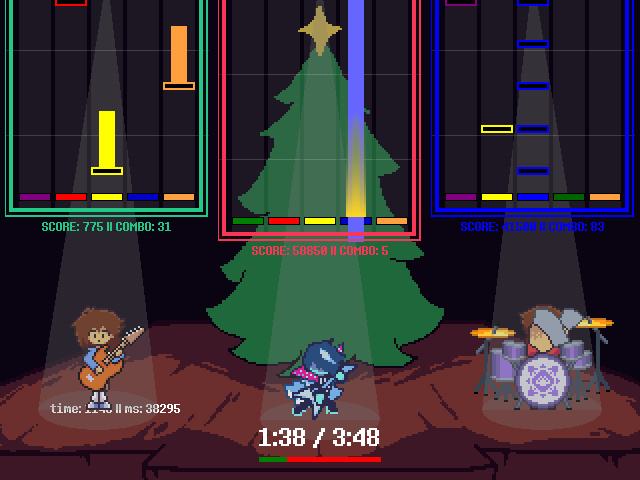
So, if I wanted to add a custom rocker sprite for Apollo, I would add these to the INI file:
            [CharacterSprites_Apollo]
            rock0="/home/kernel/Downloads/copyright_complaint_guitarist_sprite_0.png"
            rock0_xoff="19"
            rock0_yoff="41"
And, here is the result:
Cool!!
If there's something I missed, feel free to email me at:
Sorry.. you can't copy it... too bad...
(cry about it...)
(this is so bot scrapers won't send us spam!!)